
Faster Search (again), AI-Ready and the Migration Tool
This is a big update for us – and one many of you were waiting for!
In v3.3.0, we’ve increased search and filtering speeds 🚀 (again since our last update), added support for the WordPress Abilities API, add WebMCP support, seven integrations and start/end values for range and date fields.
Plus, the migration tool…
Faster search and filtering (again) 🚀
Speed matters when searching and filtering your WooCommerce products. Often, that’s the difference between clients finding what they need quickly or leaving before they do.
Your WooCommerce product filters need to be fast, and that’s what we keep improving with each update.
We’ve also improved the speed of our Enhanced Search, so searching across multiple data sources is also faster. We’ll keep the Enhanced Search feature in beta while we continue to improve and fine tune it.
How we did it
- A bitmap-based search index. In earlier versions, the search index was a traditional database index: it saved a separate row for every word in every post, and a search had to look through many of those rows. In 3.3, we rebuilt it from scratch as a bitmap-based index. For each word, it stores a compact list of the posts that contain it, so a search is a quick lookup. It also works with the bitmap-based system our filters already use, so search and filters now share the same foundation and combine faster.
- Faster ranges, using less memory. In v3.2, we introduced a bucket system for range fields, grouping similar prices, numbers and dates together so a range filter only checks a few groups. In 3.3, we reworked that system even more to keep memory use lower and make range queries faster. It’s also what makes separate start and end dates possible in the new Date Range Picker.
- Built for every kind of host. The index is designed to rebuild safely on slow and shared hosting, and indexing picks up where it left off if a request times out. On sites with a persistent object cache (Redis or Memcached), indexing no longer empties that whole cache.
These are some of the biggest changes we made in terms of performance. We’re running speed tests on large WooCommerce stores right now and we’ll post the results soon.
Smarter autocomplete
Autocomplete fields now get their suggestions from the index, so they’re faster and only suggest values that match the visitor’s other filters. On WooCommerce stores, they can also suggest SKUs and global unique IDs (GTIN, UPC, EAN or ISBN).
Interactivity API support (beta)
Turn on Interactivity API Refresh in Beta features, and Query Loop and WooCommerce Product Collection blocks update through WordPress’s own Interactivity API when visitors filter.
AI-ready
WordPress Abilities API support
In v3.3, we added support for the WordPress Abilities API, so your favourite AI agent can work on your Search & Filter setup. Connect Claude, Cursor, Gemini, Codex or another agent to your site and ask it to build your filters:
It creates the query and fields, links them up and rebuilds the index. You just place the filters on your page.
Try asking:
- “Suggest the three filters my shoppers would use most.”
- “Match a style preset to my brand colours.”
- “Switch my Category filter to a dropdown so it works better on mobile.”
WebMCP (beta): let AI agents use your filters
V3.3 also adds beta support for WebMCP, a draft web standard that lets a page hand AI agents a set of tools. Search & Filter Pro turns your fields into those tools, so an agent in your visitor’s browser can apply every filter in one step instead of clicking through the page.
It’s off by default, and works in Chrome and Edge with a trial token.
Try asking:
- “I need size L boots under $100, show me the cheapest.”
- “What can I filter by on this page?”
- “Clear the filters and show me jackets in size M.”
New integrations
You know Search & Filter works with your stack – but we understand requirements change, so we’ve listened to you and added seven new integrations to the list, some of them returning from v2.
- Avada – Post cards, and Post Cards archive elements· Read the guide
- Bricks – Container Elements, Posts Element, WooCommerce Products Element, Slider & Accordion Elements and more Read the guide
- Divi 5 – Loop Element, Blog Module, Shop (WooCommerce) Module, Portfolio Modules, Archive queries · Read the guide
- Easy Digital Downloads – Products Block and Downloads Shortcode · Read the guide
- Polylang – Translated queries, fields and results for every language · Read the guide
- WPBakery – Post Grid, Post Masonry Grid, Media Grid, Masonry Media Grid, Woo Products (WooCommerce) · Read the guide
Also new: filters now follow your term order from the Category Order and Taxonomy Terms Order plugin. The integration turns on automatically when that plugin is active, with nothing to set up.
Filter events (and more) by their start and end dates
One of the most requested v2 features is back! If your events, bookings or courses store a start date and an end date in separate fields, your Search & Filter range and date filters can now use both as a data source.
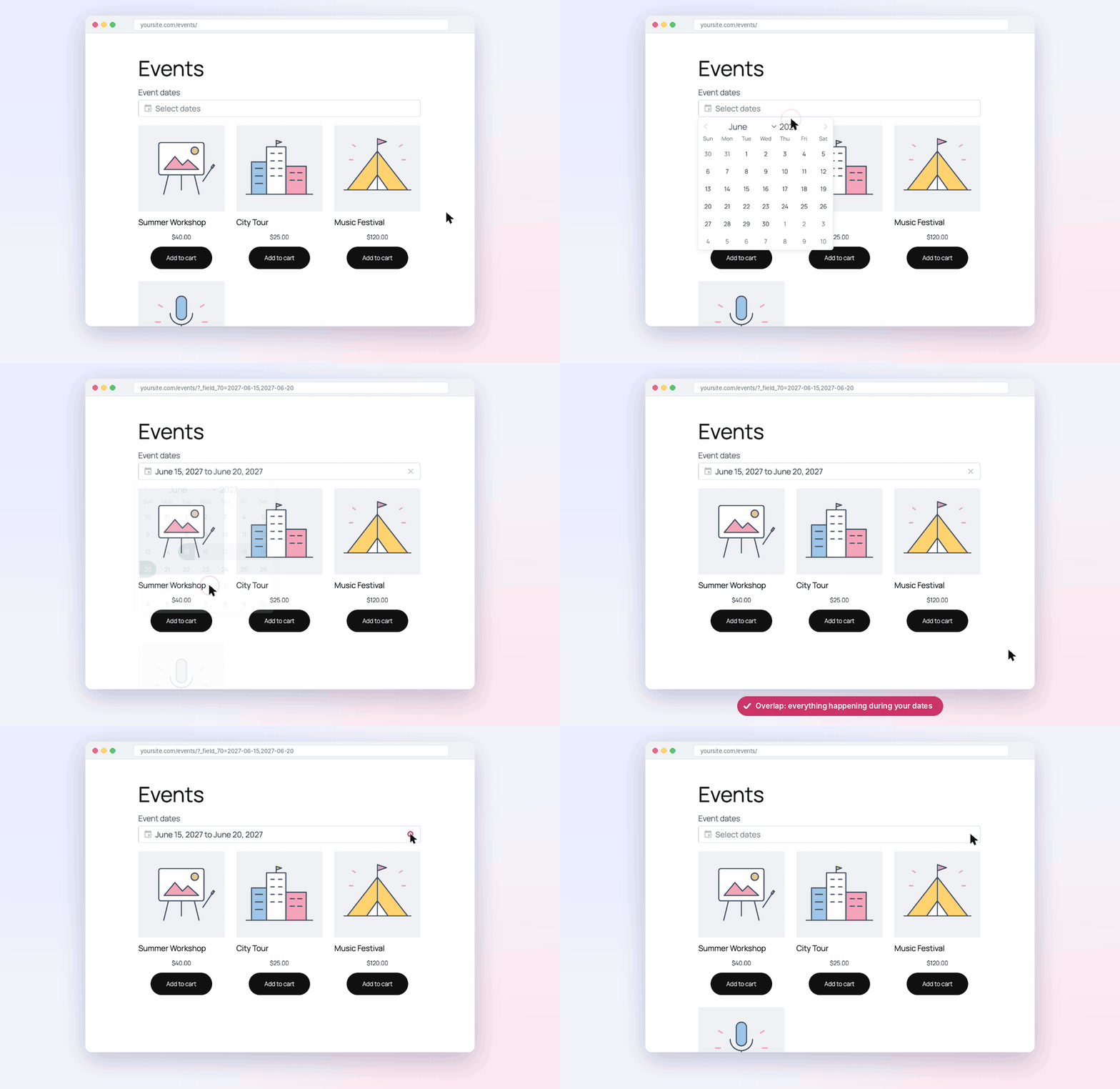
We’ve also added a new Date Range Picker field, so visitors can pick a start and an end date.
More accessible, in your site’s language
Fields have new settings for the text screen readers announce, such as the names of clear buttons and of a range field’s minimum and maximum inputs. This text, and the Date Picker’s month and weekday names, follow your site’s language unless you set your own.
And queries get extra accessibility strings too – for alerts when results update and how many results are returned.
Stuck on v2? Not for long
We’ve built the tool that you need to move from v2 to v3 without rebuilding your current Search & Filter setup from scratch.
It carries over your forms in a few clicks, so your existing setup comes with you to v3.
Our team is ready to support you through your migration starting from next week.
Upgrade notes
Both the Pro and Free plugins require that each other are on version 3.3 – so make sure you update them together.
Before you update
- Search & Filter 3.3 needs WordPress 6.8 or newer and PHP 7.4 or newer. The Abilities API needs WordPress 6.9 or newer.
- Search & Filter and Search & Filter Pro 3.3 need each other, so update both.
- Enhanced Search rebuilds its search index after the update. Enhanced (beta) search fields show no results until the rebuild finishes.
- Range fields rebuild their index automatically. They keep showing results from the old index until the rebuild is done.
What else changes
- The Date Picker calendar now starts on your site’s first day of the week (Settings > General), which is Monday unless you’ve changed it. Before, it always started on Sunday.
- New checkbox fields start with “Match any” and Tri-state Selection off, so ticking a parent category no longer empties the results. Your existing fields don’t change.
- If one of Search & Filter’s database tables goes missing or breaks, the new Database Tables screen (Settings > Debugging) and a Site Health check can find and repair it. We’ve also added extra routines to automatically fix and repair any issues.
Fixes and improvements
Last but not least – we’ve made over 100+ additional improvements in this release. Check out the changelog for the full details:
What’s Next?
V3.3 is a huge update, but we’re not stopping here. Here’s a sneak peek at what we’re working on next:
- Easier setup, with a guided wizard for building queries and filters on new projects.
- Product autocomplete, so shoppers see matching products right in the search dropdown as they type.
- Synonyms and stop words for Enhanced Search which will finally come out of beta in 3.4.0
- More performance improvements. We’re running large-scale tests on a WooCommerce store and will share the results soon.
- And much more…
Want a feature you’d like to see? Let us know!